Resistive vs. Projected Capacitive Touch: Test the Installed System
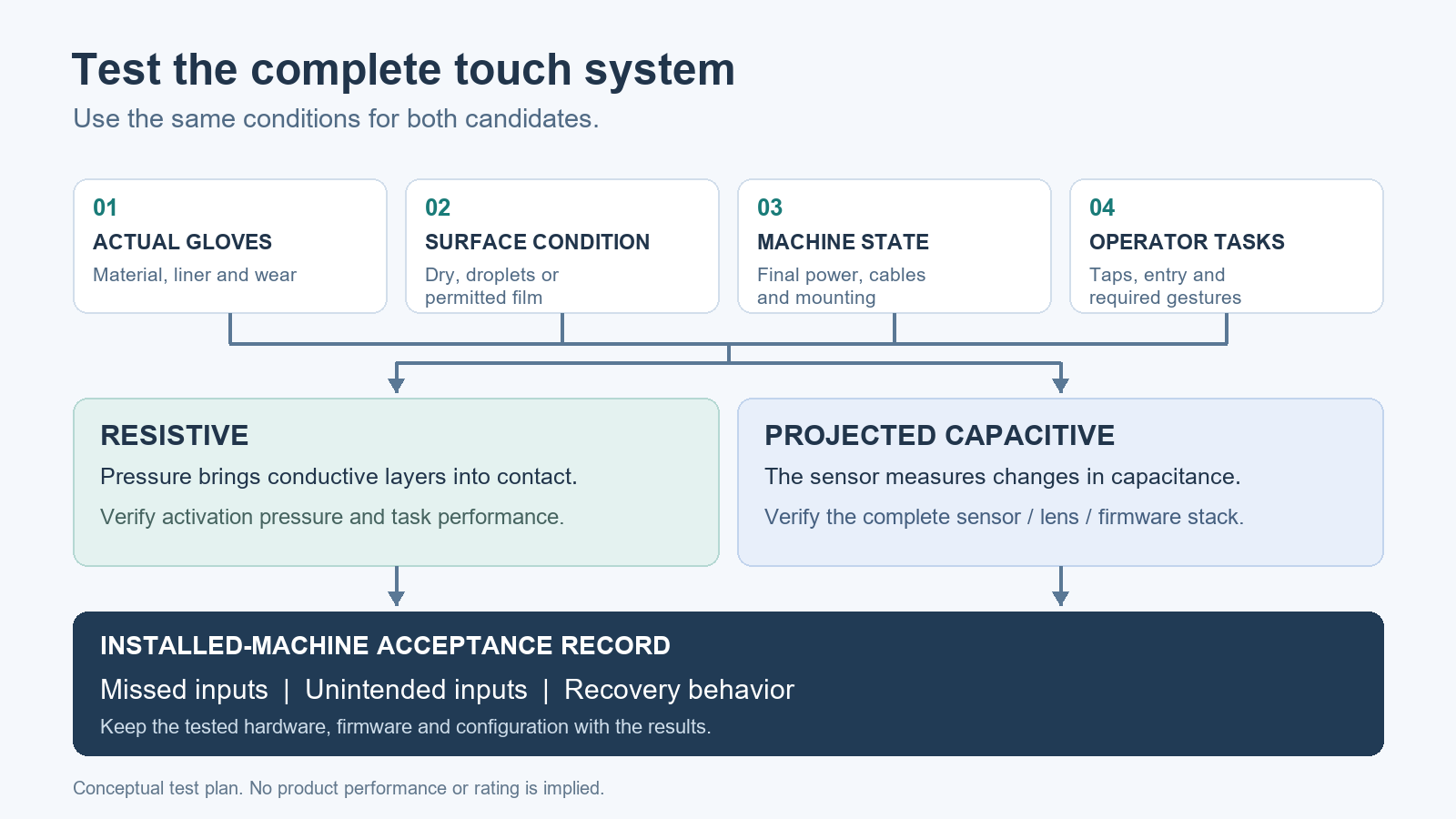
A touchscreen can look excellent on a desk and still frustrate an operator at the machine. The difference may be a wet glove, the way the display is mounted, or electrical noise that appears only when a drive starts. Choosing between resistive and projected capacitive touch therefore starts with the operating task. A technology name is useful for narrowing the candidates; it does not replace an acceptance test of the finished assembly.
Start with the sensing mechanism
Resistive touch detects position when pressure brings conductive layers together. It can respond to a gloved finger or a suitable nonconductive stylus because activation does not depend on electrical coupling through the user. The required pressure, surface construction and supported gestures still depend on the particular product. Check them rather than assuming that every resistive screen behaves identically.
Projected capacitive touch, usually shortened to PCAP, detects changes in capacitance across a sensor. The sensor, cover lens, controller and firmware work together. A PCAP implementation designed for industrial gloves and moisture can behave very differently from an ordinary consumer screen. Equally, a controller’s advertised capability does not prove that every display using it achieves that capability. The completed touch stack matters.
Bring the actual gloves
“Glove compatible” is an incomplete requirement. Record the glove manufacturer and model, material, size, liner and any double-gloving practice. Have operators test normal production gloves, including representative worn pairs. A thin nitrile glove and a thick insulated glove are different test conditions, even when both are described as work gloves.
For each condition, try the actual tasks: acknowledging an alarm, entering a numeric value, opening a menu and dragging a trend cursor. Check the corners and screen edges as well as the center. Note missed touches, repeated taps and how much pressure the operator uses. If PCAP needs a glove setting, establish whether it survives a restart and how it affects bare-finger operation. Keep that configuration with the machine documentation.
Separate water rejection from operation while wet
Two useful requirements are often confused. One is that water must not produce an unintended touch. The other is that the operator must still be able to use the screen while water is present. A panel may satisfy the first by temporarily suppressing input and still fail the second requirement.
Define the expected condition: isolated droplets, condensation, a wiped surface or a continuous film. Test only conditions permitted by the equipment manufacturer. Include the transition back to a dry surface, because recovery behavior matters during production. If cleaning liquid is involved, verify the approved cleaner and cleaning procedure separately. A working touchscreen does not establish chemical compatibility or enclosure sealing.
An ingress rating describes protection under specified conditions. It does not certify touch accuracy with a wet glove. Specify both requirements when both are needed.
Repeat the test on the installed machine
Capacitive sensing can be affected by electrical interference. Relevant sources may include the display electronics, power supply, motors and associated switching equipment. Industrial controllers can include noise filtering and other measures, but those capabilities need to be assessed in the complete installation.
Repeat the touch checks with the production power supply, final cable routing, intended bonding and actual mounting arrangement. Exercise the machine’s normal operating states, including motor starts and other events that might correlate with a symptom. Follow the equipment manufacturer’s installation instructions; do not remove protective bonding to make a touch problem disappear.
When a fault occurs, record what changed and when. “Touch stopped during drive acceleration” is a useful observation. “The screen is unreliable” gives the next engineer very little to reproduce. Change one installation variable at a time during diagnosis and record the result.
Write a small acceptance matrix
A useful test record has a row for each meaningful combination of glove, surface condition and machine state. Columns can capture the task, intended result, missed inputs, unintended inputs and recovery behavior. Set the acceptance criteria before the demonstration so that a successful test means something specific.
Use a test screen or commissioning mode that lets you exercise inputs without causing unintended machine movement. Include ordinary taps, press-and-hold actions, numeric entry and any gestures the application actually uses. Watch what happens when an input is interrupted: the operator removes a finger, loses contact during a drag, or resumes after wiping the screen.
Then repeat with more than one operator. A screen that works only with the demonstrator’s preferred tapping technique may need a different configuration or interface layout. Save the hardware revision, touch-controller firmware, configuration and application version alongside the results. A replacement unit should be checked against that record rather than accepted because the enclosure looks the same.
Make the interface easier to operate
Touch technology cannot compensate for crowded controls. Provide enough space between targets, make the active state obvious and give clear feedback when an entry is accepted. Test numeric keyboards and confirmation dialogs at the real mounting height and viewing angle. Gloves make these details particularly visible.
Choose gestures deliberately. If the task only needs buttons and data entry, do not make an essential action depend on a delicate swipe. If simultaneous touches are required, confirm that the complete hardware and software combination supports them as intended. Avoid turning a feature on the controller datasheet into an application requirement without testing it.
Specify the result you need
A purchasing specification should identify the operating gloves, permitted moisture conditions, required tasks and acceptance method. It should also identify the tested touch configuration and installation assumptions. That gives the supplier something reproducible to demonstrate and maintenance staff something useful to preserve.
For a broader selection checklist, this guide connects glove operation with the rest of the HMI decision:
https://industrialmonitordirect.com/blogs/knowledgebase/selecting-resistive-vs-capacitive-touch-for-gloved-hmis
The useful choice is the candidate that passes those conditions consistently. Resistive and PCAP are starting points; the installed system and the operator’s task determine the result.
This is a guest post from Industrial Monitor Direct, check out their products and knowledgebase!


Electrical Engineer and business owner from the Nashville, Tennessee area. I also play music, Chess and Go.